Sandboxing Tool-Using AI Agents
Learn how to run tool-using AI agents behind capability manifests, policy gates, sandboxes, audit logs, and recovery controls.
Introduction
Tool-using AI agents become useful when they can inspect files, call APIs, run commands, create tickets, update documents, or deploy changes. They also become risky at exactly the same point. A prompt can misunderstand intent, a tool can be too broad, a retry can repeat a write, or a compromised dependency can turn a routine workflow into an incident.
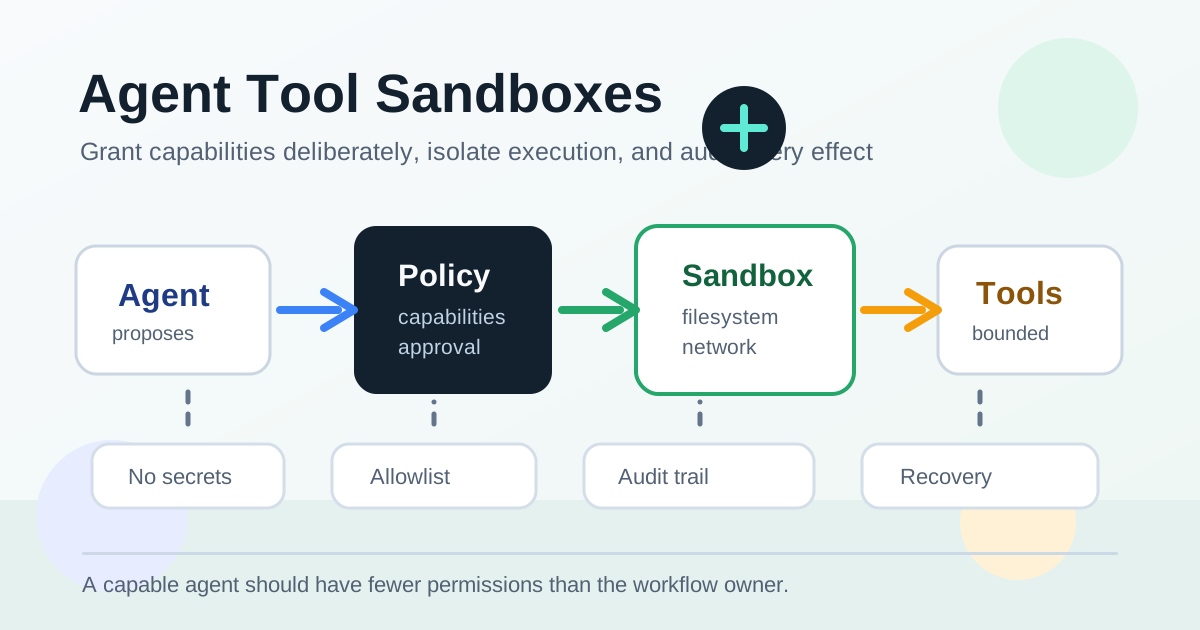
The safest production design is not "trust the model less" as a vague principle. It is to put every tool call behind explicit capability boundaries. The agent should receive only the tools, data, network access, filesystem paths, secrets, and budgets that the current workflow needs. Everything else should be unavailable, auditable, or require human approval.
This article walks through a practical sandboxing model for tool-using agents. The examples use TypeScript, SQL, and worker-style execution, but the design applies whether your agent runs inside a serverless function, a workflow engine, a container job, or a long-lived service.
Treat Tools as Capabilities, Not Functions
A normal internal helper function can assume trusted callers. An agent tool cannot. The model may choose a tool for the wrong reason, build arguments from untrusted input, or attempt an action after its permissions changed. That means every tool needs a manifest that describes what it can do before the model can call it.
A useful manifest answers these questions:
- Is the tool read-only or can it create side effects?
- Which resources can it access?
- Which arguments are accepted and validated?
- Does it require approval?
- Which workflow states may call it?
- What budget limits apply?
- How should retries and idempotency work?
Here is a compact TypeScript shape for a tool registry:
type ToolRisk = "read" | "write" | "destructive";

type ToolManifest = {
  name: string;
  description: string;
  risk: ToolRisk;
  allowedWorkflowStates: string[];
  requiredCapabilities: string[];
  requiresApproval: boolean;
  timeoutMs: number;
  maxAttempts: number;
  inputSchema: unknown;
};

const tools: Record<string, ToolManifest> = {
  searchDocs: {
    name: "searchDocs",
    description: "Search approved internal documentation.",
    risk: "read",
    allowedWorkflowStates: ["planning", "investigating"],
    requiredCapabilities: ["docs:read"],
    requiresApproval: false,
    timeoutMs: 3_000,
    maxAttempts: 2,
    inputSchema: searchDocsSchema,
  },
  createPullRequest: {
    name: "createPullRequest",
    description: "Open a pull request from a prepared branch.",
    risk: "write",
    allowedWorkflowStates: ["ready_for_review"],
    requiredCapabilities: ["repo:write", "github:pull_request:create"],
    requiresApproval: true,
    timeoutMs: 10_000,
    maxAttempts: 1,
    inputSchema: createPullRequestSchema,
  },
};
The manifest is not documentation for humans only. It is runtime data. The agent runtime uses it to decide which tools appear in the model context, which calls are accepted after the model responds, and which calls must be routed through approval.
Keep the model's menu small
Do not expose every possible tool to every run. If the workflow is summarizing a support ticket, it should not see deploy, billing, user deletion, or secret access tools. If the workflow is editing a documentation page, it should not see production database tools.
Smaller tool menus improve reliability as well as safety. The model has fewer similar choices, the prompt is shorter, and logs are easier to reason about. A good rule is to grant tools per workflow type and then narrow them further per run.
Add a Policy Gate Around Every Call
The model can propose a tool call, but the application must decide whether to execute it. This policy gate should run even when the tool was included in the prompt. Context can become stale while a workflow is paused, and a prompt-level instruction is not a security boundary.
The policy gate should inspect the run, the actor, the requested tool, the arguments, and the current environment:
type AgentRunContext = {
  runId: string;
  workflowType: string;
  state: string;
  actorId: string;
  tenantId: string;
  capabilities: Set<string>;
  approvedRequestIds: Set<string>;
};

type ToolDecision =
  | { ok: true; approvalRequired: boolean }
  | { ok: false; reason: string };

function authorizeToolCall(
  context: AgentRunContext,
  manifest: ToolManifest,
  args: unknown
): ToolDecision {
  if (!manifest.allowedWorkflowStates.includes(context.state)) {
    return { ok: false, reason: "tool_not_allowed_in_current_state" };
  }

  for (const capability of manifest.requiredCapabilities) {
    if (!context.capabilities.has(capability)) {
      return { ok: false, reason: `missing_capability:${capability}` };
    }
  }

  const validation = validateInput(manifest.inputSchema, args);
  if (!validation.ok) {
    return { ok: false, reason: "invalid_tool_arguments" };
  }

  if (manifest.requiresApproval) {
    return { ok: true, approvalRequired: true };
  }

  return { ok: true, approvalRequired: false };
}
The gate should be deterministic. It should not ask the model whether the action is safe. The model can explain why it wants to call createPullRequest, but the policy layer decides whether the current run can create a pull request.
Separate read tools from write tools
Read tools can usually be retried and cached. Write tools need more controls: idempotency keys, approval, audit events, and sometimes manual recovery. Do not hide those differences behind one generic executeTool function.
For example, a search tool might need a timeout and query validation. A "send email" tool needs recipient restrictions, template restrictions, approval, a deduplication key, and an audit trail. A shell tool needs the tightest boundary of all: working directory restrictions, command allowlists, resource limits, no ambient secrets, and a clear egress policy.
Run Risky Work in a Sandboxed Execution Boundary
The policy gate decides whether a tool call is allowed. A sandbox limits the damage if the allowed work behaves unexpectedly. You need both. A policy check without isolation assumes every tool implementation is perfect. A sandbox without policy lets the agent spend its isolation budget on the wrong work.
A practical sandbox boundary can be a container, microVM, process jail, worker isolate, remote execution service, or tightly configured job runner. The exact technology matters less than the contract you enforce:
- A dedicated working directory for the run.
- Read-only mounts for approved input.
- Write access only to declared output paths.
- No inherited environment secrets.
- Explicit outbound network allowlists.
- CPU, memory, process, and wall-clock limits.
- Structured stdout, stderr, and artifact capture.
- A cleanup policy after completion or timeout.
Represent that contract in data before starting execution:
type SandboxSpec = {
  runId: string;
  toolCallId: string;
  image: string;
  command: string[];
  workdir: string;
  readOnlyPaths: string[];
  writablePaths: string[];
  allowedHosts: string[];
  environment: Record<string, string>;
  timeoutMs: number;
  memoryMb: number;
  cpuMillis: number;
};

async function runInSandbox(spec: SandboxSpec) {
  assertNoSecrets(spec.environment);
  assertAllPathsUnderRunDirectory(spec);
  assertHostAllowlist(spec.allowedHosts);

  return sandboxClient.execute({
    ...spec,
    network: spec.allowedHosts.length ? "restricted" : "none",
    captureArtifacts: true,
  });
}
The checks before sandboxClient.execute are deliberately boring. Boring checks are good. They catch path traversal, accidental secret injection, and broad network access before any untrusted command starts.
Avoid ambient authority
Ambient authority is access that exists because the process already has it, not because the current task requested it. Examples include cloud credentials in environment variables, a mounted home directory, a broad service token, a default kubeconfig, or network access to internal services.
Tool-using agents should not run with ambient authority. Give each run short-lived credentials scoped to the exact capability it needs. If the agent needs to update one issue tracker project, do not give it a personal access token that can administer every project. If it needs to read a repo, do not mount the whole developer workstation.
Audit Intent, Decision, and Effect
If an agent changes production state, the audit trail must explain more than "the agent did it." You need enough detail to answer what the model requested, what policy decided, who approved it, what actually ran, what changed, and how to recover.
The audit trail should be append-only and structured. At minimum, keep the run ID, tool call ID, event type, actor ID, tool name, policy decision, request payload, result payload, and timestamp. Index events by run ID and creation time so an incident review can reconstruct the sequence without scraping logs.
Useful event types include:
tool_requestedtool_deniedapproval_requestedapproval_grantedsandbox_startedsandbox_timed_outtool_completedtool_failedrecovery_required
Store denied requests, not only successful ones. Denials show whether prompts are drifting, users are asking for forbidden actions, or a workflow needs a legitimate new capability. They also make security reviews concrete because the team can inspect real attempted actions instead of debating hypothetical risk.
Design for Failure and Recovery
Sandboxing is not only about blocking bad actions. It is also about making failure recoverable. Tool calls can time out, lose network access, exceed resource limits, or complete externally before the local worker records the result.
For write tools, use the same reliability patterns you would use in payment, deployment, and queue systems:
- Record intent before the side effect.
- Use an idempotency key derived from the run and tool call.
- Persist the external identifier returned by the tool.
- Reconcile uncertain outcomes before retrying.
- Route destructive or ambiguous repeats to human review.
- Store enough artifacts to debug the failed attempt.
Here is a test shape that catches common mistakes:
test("write tool is not repeated after worker crash", async () => {
  const run = await createAgentRun({
    capabilities: ["repo:write", "github:pull_request:create"],
  });

  const firstAttempt = executeUntilCrash(run.id, {
    crashAfter: "external_side_effect",
  });

  await expect(firstAttempt).rejects.toThrow("simulated worker crash");

  await resumeAgentRun(run.id);

  const calls = await fakeGitHub.listCreatePullRequestCalls();
  expect(calls).toHaveLength(1);

  const audit = await db.auditEvents.findByRunId(run.id);
  expect(audit.map((event) => event.event_type)).toContain("recovery_required");
  expect(audit.map((event) => event.event_type)).toContain("tool_completed");
});
This test is more valuable than a happy-path tool test. It proves the runtime can resume without repeating the side effect. Add similar tests for denied tools, expired approvals, sandbox timeouts, network blocks, path traversal attempts, and missing capabilities.
Make budgets visible
Every sandbox should have budgets for runtime, tokens, tool calls, memory, storage, and outbound requests. Budgets protect the rest of the system from runaway loops and make incidents easier to stop.
Expose budget exhaustion as a workflow state, not a generic failure. A run that needs more budget may be valid, but it should pause and ask for approval. A run that repeatedly spends budget without progress should be cancelled or sent to investigation.
Roll Out With a Capability Matrix
The first version of an agent sandbox does not need to support every workflow. Start with a capability matrix that maps workflow types to tools and boundaries:
| Workflow | Allowed tools | Writes | Approval | Network |
|---|---|---|---|---|
| Documentation summary | docs search, repo read | none | no | docs host only |
| Pull request preparation | repo read, tests, branch write | branch only | before PR | package registry, GitHub |
| Incident draft | logs read, runbook search | draft comment | before posting | observability, ticketing |
| Deployment helper | release read, deploy status | deploy trigger | always | deployment API |
This matrix gives engineering, security, and product teams a shared object to review. It also keeps implementation pressure realistic. Instead of asking whether "agents can use the shell," the team decides which workflow can run which command class, in which directory, with which network egress, under which approval gate.
Prefer expansion by evidence
Add capabilities after observing real denied requests, manual workarounds, and support cases. Do not grant broad access because a demo would be smoother. The goal is not maximum autonomy on day one. The goal is a system that can safely earn more autonomy because it records why actions were denied, where humans approved work, and which recovery paths succeeded.
Conclusion and Next Steps
Tool-using agents need the same production boundaries as any other system that can change state: least privilege, isolation, auditability, idempotency, and recoverable failure handling. The model can propose actions, but the runtime must own authorization, execution, and recovery.
Start by inventorying your tools. Mark each one as read, write, or destructive. Add manifests, hide tools that do not apply to the current workflow, and place a deterministic policy gate before execution. Then put risky tools inside a sandbox with explicit filesystem, network, secret, and resource limits. Once the audit trail and failure tests are boring, you can expand the capability matrix with much more confidence.
About this story
This article was written by Gen-AI using GPT 5.5 or Opus 4.7. Verify technical guidance before using it in production systems.